

What is robots.txt? | How a robots.txt file Works
When you visit a website, you’re not the only visitor. Alongside human users, automated bots also interact with websites every day—some with good intentions, like indexing content for search engines, and others with more harmful goals, such as scraping data or probing for vulnerabilities. To help regulate this digital traffic, many websites rely on a simple yet powerful tool: the robots.txt file.
This small text file offers a structured way to communicate with bots, especially search engine crawlers, about what they are allowed—or not allowed—to access. This blog takes a deeper dive into how robots.txt works, what it looks like, and how it’s an essential part of bot management for websites.
What is robots.txt?
A robots.txt file is a plain text document placed in the root directory of a website. Its main purpose is to guide web crawlers—automated bots used by search engines—on which parts of a website they can crawl and index. This system works through a set of rules based on the robots exclusion protocol, a standard developed in the 1990s to promote responsible web crawling.
Think of the robots.txt file as a set of house rules. Well-behaved bots, such as Google’s or Bing’s crawlers, will read and obey them. Bad bots, unfortunately, often disregard these instructions. Still, setting clear parameters is the first step in effective web crawler control and in establishing good bot management for websites.
How Does a robots.txt File Work?
Understanding how robots.txt works begins with knowing where it lives. The file must be placed at the root of your domain (for example: https://www.example.com/robots.txt). Once a crawler visits the site, it will first attempt to read this file before navigating elsewhere.
The robots.txt file contains user-agent-specific instructions and commands such as Disallow, Allow, and sometimes Crawl-delay. These tell bots what to avoid and where they’re welcome.
It’s important to note that while these instructions are clear, they are not enforceable. Compliant bots will follow them, but malicious bots may ignore them entirely. However, when combined with other strategies for bot management for websites, the robots.txt file remains a foundational tool.
What Protocols Are Used In a robots.txt File?
There are two main protocols associated with a robots.txt file:
Robots Exclusion Protocol: This is the primary standard used to tell crawlers which URLs should not be accessed. Commands like Disallow, Allow, and Crawl-delay fall under this protocol.
Sitemaps Protocol: While the exclusion protocol tells bots what not to do, the sitemaps in robots.txt tell them what they should do. This includes the location of an XML sitemap that bots can use to better understand the structure of the website.
The effective use of these protocols enhances web crawler control and ensures that important pages are properly indexed while sensitive or redundant content is skipped.
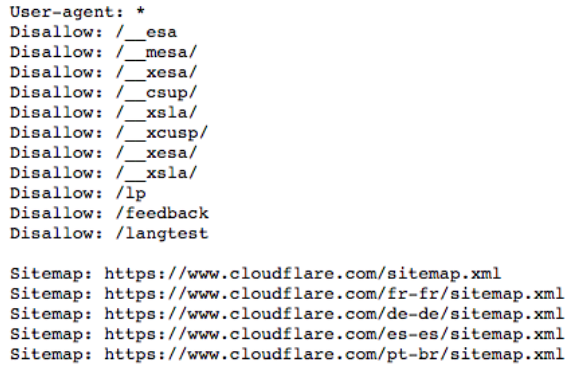
Example of a robots.txt File
What is a User Agent? What Does ‘User-agent: *’ Mean?
A “user agent” identifies the bot accessing the site. For example, Googlebot is the user agent for Google. In a robots.txt file, the User-agent: directive specifies which bot the rule applies to.
Using User-agent: * applies the rule to all bots, a common approach when you want uniform rules across all web crawlers. This helps simplify bot management for websites, especially when dealing with a variety of known and unknown bots.
How Do ‘Disallow’ Commands Work in a robots.txt File?
The disallow command in robots.txt is used to block access to specific parts of a site. Here are some typical applications:
Block One File
Disallow: /learning/bots/what-is-a-bot/
This prevents bots from crawling that single file. It’s a basic yet effective method of web crawler control.
Block One Directory
Disallow: /__mesa/
This tells bots not to index anything under the /admin/ directory. The disallow command in robots.txt is often used this way to secure backend or redundant sections of a site.
Allow Full Access
Disallow:
Leaving this command blank signals that bots may crawl everything—helpful when you want complete visibility in search engines.
Hide the Entire Website
Disallow: /
This prevents bots from crawling any part of the site. While drastic, it can be useful during site maintenance or private beta launches.
What Other Commands Are Part of the Robots Exclusion Protocol?
Beyond Disallow, there are a few more commands recognized under the robots exclusion protocol:
Allow
Allow: /blog/
Used to make exceptions within otherwise restricted sections, the Allow directive gives bots permission to access specified paths.
Crawl-delay
Crawl-delay: 10
This tells bots to wait 10 seconds between requests, helping reduce server load. Note that not all bots—Googlebot, for instance—honor this command, though many do.
Understanding these commands is vital to using the robots exclusion protocol effectively for better bot management for websites.
What Is the Sitemaps Protocol? Why Is It Included in robots.txt?
The sitemaps in robots.txt protocol lets you guide bots to your site’s XML sitemap. This file lists all important URLs and assists crawlers in prioritizing what to index.
By including something like:
Sitemap: https://www.example.com/sitemap.xml
you improve the discoverability of key pages, providing stronger web crawler control and enhancing your site’s SEO performance.
How Does Robots.txt Relate to Bot Management?
While not a defense against malicious bots, the robots.txt file plays a key role in the broader strategy of bot management for websites. It sets boundaries for well-behaved bots and helps reduce unnecessary server load.
For more advanced protection, tools like firewall rules and bot detection services are recommended. Still, as a foundational component of SEO and crawl efficiency, how robots.txt works should not be overlooked.
Robots.txt Easter Eggs
Finally, developers sometimes embed light-hearted messages in robots.txt files—a nod to the fact that few people ever see them. From fictional robot uprisings to pleas for bots to “be nice,” these hidden lines are harmless and quirky.
Partner with our Digital Marketing Agency
Ask Engage Coders to create a comprehensive and inclusive digital marketing plan that takes your business to new heights.
Final Thoughts
In conclusion, whether you’re managing a large web property or launching a simple blog, understanding how robots.txt works and using it wisely is critical. With thoughtful use of the robots exclusion protocol, strategic web crawler control, and proper implementation of sitemaps in robots.txt, you’ll not only guide search engines but also strengthen your site’s performance and visibility.


