

Lazy Loading Explained: Speed Up Your Site & UX Fast
When you open a webpage, you expect it to load fast. But what happens when the page is filled with heavy images and videos? It often slows down, frustrating users and driving them away. This is where lazy loading comes in—a smart technique that helps improve website load time, reduce bounce rates, and enhance SEO.
In this blog, we’ll break down lazy loading, why it matters, and how to implement lazy loading effectively without risking your visibility in search engines. Whether you’re a developer or a site owner, these lazy loading best practices will help you strike the right balance between performance and crawlability.
What is Lazy Loading?
Lazy loading is a web performance technique where certain non-critical content—usually images, videos, or JavaScript elements are not loaded until they are needed. That is, a resource only loads when it appears within the user’s viewport as they scroll down.
For example, if you have a product page with 15 images but only 3 are visible at the top, lazy loading will load just those 3. The rest will load only when the user scrolls. This not only helps improve website load time but also offers a faster, smoother user experience.
Lazy loading images HTML is a common use case where you can simply add the loading=”lazy” attribute to your <img> tag, like this:
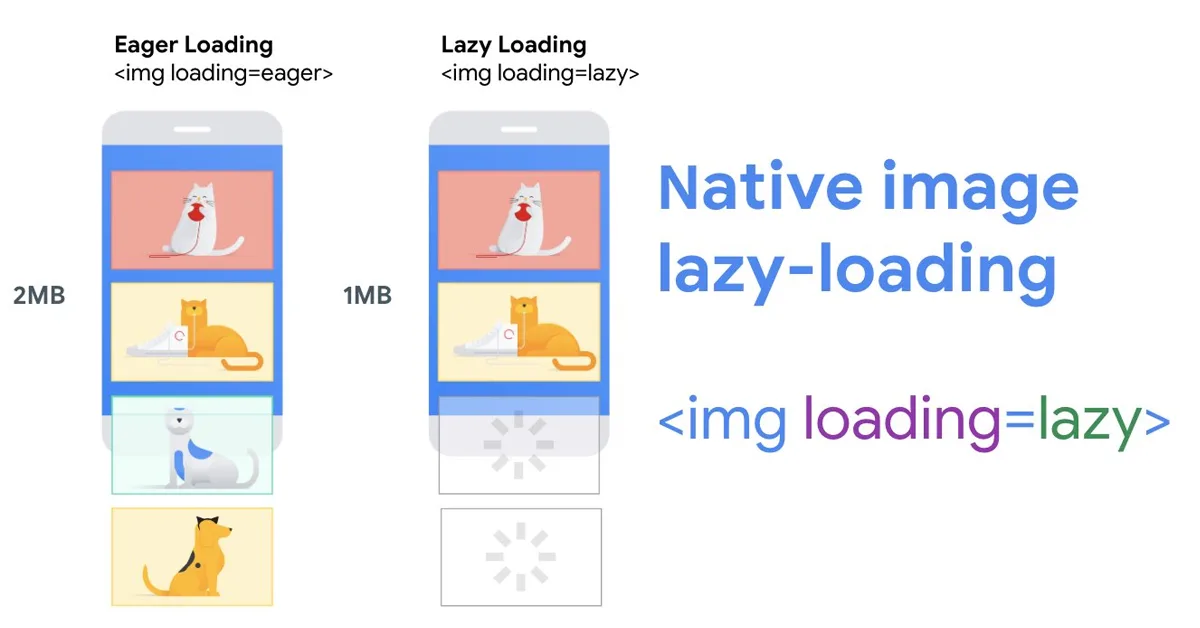
This tells the browser to delay loading the image until it’s almost visible.
Why Lazy Loading Matters in SEO
Google considers user experience and speed as key ranking factors. Lazy loading SEO helps in multiple ways:
1. Improves Core Web Vitals: Lazy loading and Core Web Vitals go hand in hand. It can improve metrics like Largest Contentful Paint (LCP) and Interaction to Next Paint (INP), which affect your rankings.
2. Reduces server load: By loading only what’s necessary, it lowers the strain on your server.
3. Keeps users engaged: Faster load times mean users are more likely to stay and interact with your page.
However, while lazy loading boosts performance, poor implementation can harm your ability to index lazy-loaded content. Search engines like Google need to be able to crawl and render all relevant content.
How Lazy Loading Works: The Technical Foundation
There are a few methods to understand when learning how to implement lazy loading:
Native HTML Lazy Loading
This method uses the simple loading=”lazy” attribute directly in your HTML image or iframe tags. It’s beginner-friendly and works in most modern browsers.
IntersectionObserver API
A JavaScript API that watches when an element enters the viewport and loads it. This approach is more advanced and ideal for lazy-loading backgrounds or complex assets.
Third-party plugins and frameworks
Platforms like WordPress and Shopify often include built-in lazy loading features. You can also find plugins tailored to specific frameworks that follow lazy loading best practices.
Knowing how to implement lazy loading correctly means choosing the right method for your site’s platform and content type.
Lazy Loading in Client-side vs. Server-side Rendering
Your rendering approach can impact how lazy loading SEO works:
- Client-side Rendering (CSR): Content is built in the browser using JavaScript. If lazy loading relies on scroll events, search engines may miss out on important content.
- Server-side Rendering (SSR): Pages are fully rendered on the server and sent as complete HTML. Lazy-loaded content is more likely to be seen by search engines, which helps index lazy-loaded content properly.
For example, a Shopify store (using SSR) that lazy-loads product thumbnails still ensures Googlebot can crawl the images because the HTML references are visible.

SEO Problems That Lazy Loading Can Cause
While lazy loading offers many benefits, it can hurt your SEO if not done correctly:
- Content Missed by Googlebot: If content loads only on scroll, and Googlebot doesn’t scroll, it may never get indexed.
- Above-the-fold Content Hidden: Lazy-loading hero banners or top headings can delay visibility and hurt your Largest Contentful Paint (LCP).
- JavaScript-dependent Rendering: If key links or schema markup load via JavaScript post-scroll, search engines may not see them.
Always prioritize loading of above-the-fold content and use fallback methods like <noscript> tags when needed.
How to Make Lazy-Loaded Content Crawlable and Indexable
To make sure lazy loading SEO doesn’t backfire, follow these steps:
- Avoid lazy-loading critical content: Always load above-the-fold elements like banners, internal links, and structured data immediately.
- Use fallback: For JavaScript-rendered content, provide fallback HTML to help search engines see the content.
- Inspect with Google Search Console: Use the URL Inspection Tool to verify what content is actually visible in Google’s rendered HTML.
These are all lazy loading best practices that help you index lazy-loaded content more effectively.
Best Practices to Implement Lazy Loading Without Hurting SEO
When looking at how to implement lazy loading safely, here are a few golden rules:
- Don’t lazy-load hero images or H1s: They should appear in the initial render.
- Use IntersectionObserver instead of scroll events: It works better with Googlebot and ensures better rendering.
- Always add descriptive alt text: Lazy loading images HTML still needs meaningful alt attributes for SEO and accessibility.
- Use srcset for responsive loading: Provide multiple image sizes for different devices to improve website load time on mobile.
For example:
This ensures faster loading while keeping Google happy.
Start Monitoring Your Lazy-Loaded Assets
Lazy loading is not a one-and-done solution. You must actively monitor what search engines can see:
- Use Google Search Console to see how Googlebot renders your content
- Check Core Web Vitals using PageSpeed Insights to assess LCP improvements
- Analyze server logs to see which images or links Googlebot actually requested
Keeping an eye on your lazy-loaded assets helps ensure you continue to improve website load time while retaining SEO visibility.
Partner with our Digital Marketing Agency
Ask Engage Coders to create a comprehensive and inclusive digital marketing plan that takes your business to new heights.
Contact Us
Final Thoughts
Lazy loading SEO is a powerful tactic, but only if applied with care. From understanding lazy loading images HTML to knowing how to implement lazy loading with JavaScript APIs or native HTML, it’s all about keeping your content visible, fast, and user-friendly.
Follow these lazy loading best practices to enhance performance, satisfy search engines, and deliver a seamless user experience.


