

The 6 Best PPC Keyword Tools to Elevate Your Ad Campaigns
Selecting the right keywords for your pay-per-click (PPC) campaigns enhances ad targeting, boosts click-through rates, and increases advertising ROI.
But how do you identify the most effective keywords?
By utilizing a PPC keyword research tool.
PPC keyword tools assist in generating fresh keyword ideas while offering insights into cost per click (CPC), search volume, and competition levels.
In this post, we’ll explore the key features of the seven best PPC keyword research tools currently available.
Table of Contents
Top 6 PPC Keyword Tools
Before diving into the specifics of our top PPC keyword tools, here is a quick overview of how these PPC keyword research tools differ in the type of data they offer.
| Unique Selling Point | Pricing |
|---|---|
| Semrush Keyword Magic Tool Semrush’s most powerful keyword research tool. Get comprehensive keyword suggestions pulled from Semrush’s database of over 25.5 billion keywords |
Free: $0.00/month Pro: $139.95/month Guru: $249.95/month Business: $499.95/month |
| Semrush Keyword Overview A first stop for judging the estimated value and competition of a specific keyword |
Free: $0.00/month Pro: $139.95/month Guru: $249.95/month Business: $499.95/month |
| Google Keyword Planner Integration with Google Ads, providing accurate, up-to-date search volume and cost estimates directly from Google |
Free |
| SpyFu Multiple competitor intelligence features, including the ability to see what keywords other sites are bidding on that you are not |
Basic: $39/month Professional: $79/month |
| Microsoft Keyword Planner Access to unique keyword data specific to the Microsoft Search Network (including Bing) |
Free |
| Keywords Everywhere Multiple keyword insights for any query displayed directly in the search results |
Bronze: $2.25/month Silver: $6.00/month Gold: $25.00/month Platinum: $80.00/month |
1. Semrush Keyword Magic Tool
The Keyword Magic Tool serves as a robust resource for creating extensive keyword lists tailored to your PPC campaigns.
Starting with a single seed keyword, the tool generates an exhaustive list of related terms, organized into topic-specific subgroups.
This data is sourced from Semrush’s expansive database, which contains over 25.5 billion keywords.
To begin building your keyword list, input a seed keyword and click “Search.”

Keyword Magic Tool Search: Running Shoes
For instance, searching for “running shoes” yields over 254,000 keyword suggestions.
The table displays key metrics such as search intent, volume, keyword difficulty, and average CPC for each keyword.
Keyword Magic Tool: Running Shoes
While exploring keyword suggestions, you can toggle between match types like “Broad Match,” “Exact Match,” and “Related.”
Keyword Magic Tool: Running Shoes Keyword Types
Exploring groups and subgroups in the left-hand menu helps uncover niche topics and ideas for PPC ad groups.
You can sort groups by the number of keywords or their combined monthly search volume.
Click the eye icon next to a group to exclude it from your list.
Keyword Magic Tool: Running Shoes Groups
You can also filter for question based keywords, which turns the tool into a simple PPC keyword generator when you need ready ideas.
Keyword Magic Tool: Running Shoes Questions
To add a keyword to your list, simply check the box next to it and click “Send keywords.”
Keyword Magic Tool: Running Shoes Send Keyword
What We Like
The Keyword Magic Tool excels at conducting detailed keyword research for PPC campaigns.
Its vast database, user-friendly interface, and filtering capabilities make it perfect for discovering niche topics and high-performing keywords.
It stands out as one of the best PPC tools for building a complete keyword list that supports cleaner targeting.
Pricing
The Keyword Magic Tool is available on all Semrush plans, but limits vary based on the plan:
- Free: $0.00/month (10 reports/day, 10 results/report, 10 seed keywords/hour)
- Pro: $139.95/month (3,000 reports/day, 10,000 results/report, 100 seed keywords/hour)
- Guru: $249.95/month (5,000 reports/day, 30,000 results/report, 100 seed keywords/hour)
- Business: $499.95/month (10,000 reports/day, 50,000 results/report, 100 seed keywords/hour)
2. Semrush Keyword Overview
Semrush’s Keyword Overview report provides a high-level summary of any keyword within its database.
Start by entering up to 100 keywords into the search bar, selecting your target location, and clicking “Search.”
Pro Tip: Add your domain name for personalized, AI-powered keyword insights.
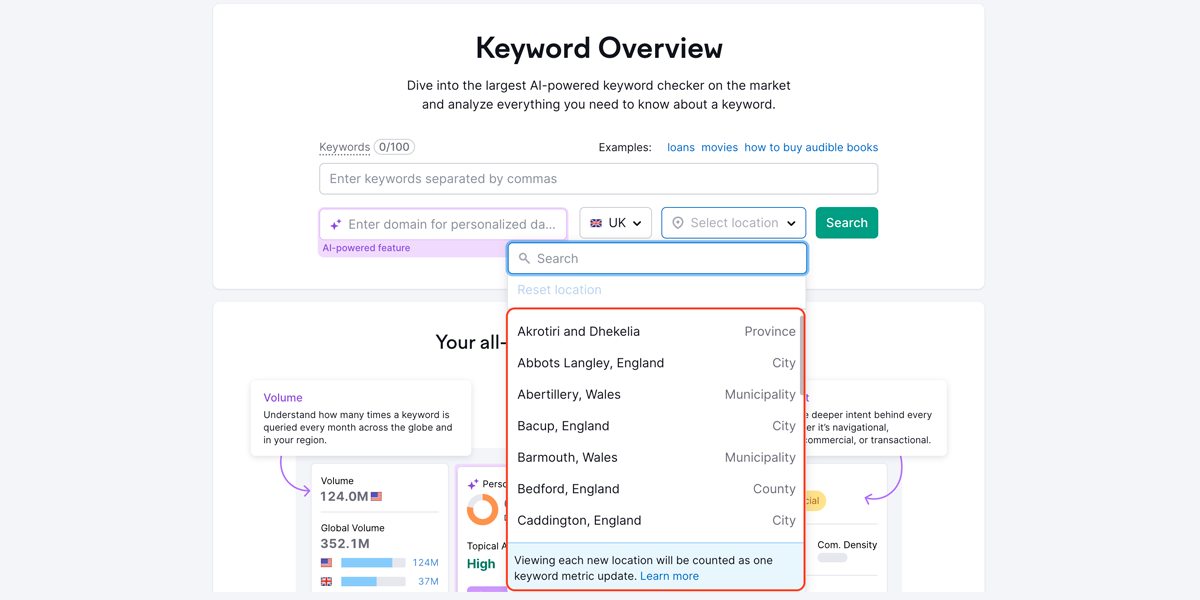
Keyword Overview Search: Dog Bed
You’ll receive information such as:
- Volume: Average monthly searches for the keyword
- Keyword Difficulty: How challenging it is for the average website to rank for the keyword
- Personal Keyword Difficulty: How easy or hard it is for your domain to rank for the keyword
- Intent: The motivation behind the search
- CPC: Average cost per click for paid ads
- Competitive Density: Level of advertiser competition for the term
- Ads: Number of PPC ads appearing for the term in Google’s search results
- Keyword Ideas: Variations, related questions, and keyword clusters
Keyword Overview: Dog Bed
For deeper insights into the keyword’s PPC value, scroll to the bottom of the report.
You’ll find top “PLA Copies” (product listing copies) and “Ad Copies” (Google Ads) that appear in paid search results.
Analyze these ads and their landing pages to craft your own ad copy and PPC landing pages.
Keyword Overview: PLA Copies
The “Keyword Ad History” widget shows how actively advertisers have bid on the keyword over the past 12 months. Click “View full report” for more details.
Keyword Overview: Keyword Ad History
What We Like
The Keyword Overview tool is ideal for obtaining a quick, high-level summary of a specific keyword’s estimated value and competition level.
It also provides easy access to additional keyword reports for more in-depth analysis, making it one of the best keyword research tools available.
Pricing
The Keyword Overview tool is accessible on all Semrush plans:
- Free: $0.00/month
- Pro: $139.95/month
- Guru: $249.95/month
- Business: $499.95/month
3. Google Keyword Planner
Google Keyword Planner is a free tool provided by Google to assist with keyword research and PPC campaign planning.
To use Keyword Planner, you’ll first need to create a free Google Ads account. However, running an active campaign isn’t necessary to access the tool for PPC keyword research.
Head to Google Ads and click “Start now” to sign in.
Google Ads Homepage
Next, confirm your account settings and click “Submit.”
Google Ads Account Settings
On the confirmation page, click “Explore your account.”
Once your Google Ads account is set up, click “Tools” in the menu bar. Under “Planning,” select “Keyword Planner.”
Google Ads Tools: Keyword Planner
Next, click “Discover new keywords.”
Google Keyword Planner: Discover New Keywords
From here, enter initial keywords or a web address.
In this example, we’ll use the “Start with keywords” option.
Once you’ve entered your starting keywords, hit “Get results.”
Keyword Planner Search: SEO Tools
Pro Tip: When starting with keywords, you can input your website’s URL to filter out irrelevant keyword ideas.
Keyword Planner will generate a list of terms related to your keyword, sorted by relevance.
You’ll also find metrics such as average monthly searches (range estimate) and historical benchmark costs for successful top-page bids for each keyword.
Keyword Planner: SEO Tools
What We Like
Keyword Planner is a user-friendly tool for discovering keywords directly tied to your business.
It’s also useful for competitor analysis.
Select “Start with website” during your keyword research, then enter a competitor’s URL and hit “Get results.”
GKP Discover: Start With Website Improve SEO
Pricing
Google Keyword Planner is free to use with a Google Ads account. However, precise keyword search volume data requires an active Google Ads campaign.
4. SpyFu
SpyFu is a marketing suite offering insights into PPC and SEO campaigns.
The tool includes a competitive intelligence feature that lets you view other sites’ PPC keywords and ad spend history.
Begin by entering a domain into the search bar at the top of the screen and clicking “SEARCH.”
Under the “PPC Overview” section, you’ll receive a high-level summary of the domain’s PPC campaigns.
SpyFu PPC Research
This report includes data like the domain’s total number of unique paid keywords, its estimated monthly PPC clicks, and an estimate of its monthly PPC spend.
Scroll down to see a list of the domain’s best-performing paid keywords.
You’ll find metrics such as the average CPC for that keyword, an estimate of the monthly cost of targeting it, and the percentage of clicks going to paid results for that keyword.
SpyFu PPC Research: Successful Paid Keywords
Under the “Competitors” section, you’ll see the domain’s top PPC competitors, with data plotted on a graph.
A graph will also show the level of keyword overlap between the domain you entered and its competitors.
SpyFu PPC Research: Top Ad Competitors
What We Like
One standout SpyFu feature is the ability to identify keyword opportunities based on terms your competitors are targeting but you’re not.
Under the “Kombat” section, click the “Consider Buying” option.
SpyFu PPC Research: Kombat
You’ll then see a list of all the keywords your competitors are buying that you should consider purchasing.
SpyFu PPC: Consider Buying
Pricing
SpyFu offers two paid subscription plans: Basic and Professional.
The Basic plan limits reports to 10,000 rows, while the Professional plan provides unlimited report data and access to 15 years of historical keyword data.
- Basic: $39/month
- Professional: $79/month
5. Microsoft Advertising Keyword Planner
Microsoft Advertising Keyword Planner is a tool designed for conducting keyword research and managing PPC campaigns on the Microsoft Search Network (including Bing).
Similar to Google Keyword Planner, this tool allows you to search for new keywords by entering a seed term or website URL. You can also explore keywords based on categories relevant to your product or service.

Keyword suggestions come with data such as search volume, estimated cost, competition level, and suggested minimum bid.
To get started, log into your Microsoft Advertising account (or create one if you haven’t already). Select “Tools” > “Keywords.”
Microsoft Ads: Browse Tools
Next, click “Search for new keywords using a phrase or website.”
Microsoft Ads Keyword Planner
Fill out the form that appears and click “Get suggestions.”
Microsoft Ads Keyword Planner: Find Keywords
This will generate a detailed list of keyword suggestions.
Microsoft Ads Keyword Planner: Keywords
What We Like
Microsoft Advertising Keyword Planner provides access to unique keyword data specific to the Microsoft Search Network.
This enables you to create highly targeted PPC campaigns that may be less expensive than Google Ads campaigns.
Pricing
Microsoft Advertising Keyword Planner is free to use with a Microsoft Advertising account.
6. Keywords Everywhere
Keywords Everywhere is a paid browser extension available for Google Chrome, Firefox, and Microsoft Edge.
Keywords Everywhere Homepage
The tool displays search volume, CPC, and competition data directly on the search engine results page (SERP) whenever you search for a keyword.
Google SERP: Portable Speakers (Keywords Everywhere)
It also provides website traffic metrics for each search result, including estimated traffic and the number of keywords the site ranks for.
Portable Speakers: Keywords Everywhere Data
Additionally, Keywords Everywhere shows multiple widgets on the right side of the SERPs for every search you perform.
Here, you’ll find a search volume trend chart for your query dating back to 2004.
Keywords Everywhere: Trend Data for Portable Speakers
You’ll also see topical keywords related to your query.
Keywords Everywhere: Topical Keywords (People Also Search For)
And related keywords that have been trending over the past 30 days.
Keywords Everywhere: Trending Keywords
Plus, you’ll get a list of long-tail keywords.
Keywords Everywhere: Long-Tail Keywords
What We Like
Keywords Everywhere lets you view real-time keyword data directly in your browser.
This makes it an excellent solution for conducting on-the-fly keyword analysis.

Pricing
Keywords Everywhere operates on a credit system where one credit equals one keyword.
The tool offers four subscription plans, each with a different annual credit allowance:
- Bronze: $2.25/month (100,000 credits/year)
- Silver: $6.00/month (400,000 credits/year)
- Gold: $25.00/month (2 million credits/year)
- Platinum: $80.00/month (8 million credits/year)
Maximize ROI with the Best PPC Keyword Tools
Using the right PPC keyword tools significantly enhances your ability to create successful ad campaigns.
These tools empower you to develop a highly targeted and cost-efficient PPC strategy by enabling you to uncover new keyword opportunities, assess essential keyword metrics, and analyze competitor activities.
Now is the time to harness the capabilities of solutions like the PPC Keyword Tool, Keyword Magic Tool, and Keyword Overview. By doing so, you can optimize your campaigns, attract more qualified traffic, and maximize the return on your advertising budget.
Partner with our Digital Marketing Agency
Ask Engage Coders to create a comprehensive and inclusive digital marketing plan that takes your business to new heights.
FAQs
Group keywords by shared intent or theme so each ad group stays focused. This keeps ad copy relevant and helps improve click-through rate.
Negative keywords block your ads from irrelevant searches. This prevents wasted spend and sends traffic only from users who match your offer.
Yes. Most tools support both platforms and provide search volume, competition, and CPC data for each network.
Short-tail keywords are broad and competitive, while long-tail keywords are specific, less costly, and often convert better.
Branded keywords usually convert well because users already know your business. Use them, but balance with non-branded terms to reach new customers.
Check CPC and competition levels. If the cost is high compared to your budget or margins, choose lower-competition alternatives.
Focus on search volume, CPC, competition, intent, and relevance. These show whether a keyword can drive affordable and meaningful traffic.
Yes. Both tools offer keyword ideas, competitor insights, and CPC data that help you plan Google Ads campaigns.
Google Keyword Planner tends to provide the closest CPC and volume estimates because it uses Google’s own ad data.
They reveal the keywords most likely to convert within your budget, helping reduce waste and focus spend where it brings returns.

![What Are Good Google Ads Benchmarks In 2025? [STUDY]](https://www.engagecoders.com/wp-content/uploads/2025/07/image1-5-450x350.png)


