
How to Audit Your Website Content and Identify Pages That Need Improvement
A website can contain hundreds of blog posts, service pages, and resource guides, but not every page contributes equally to business goals. Some pages contain outdated information, others fail to answer visitors’ questions, and some cover topics already addressed elsewhere on the website.
Publishing more content will not necessarily solve these problems. Reviewing and improving existing pages can be a more effective starting point.
A website content audit helps businesses identify which pages perform well, which need improvement, and which no longer serve a clear purpose. By combining content quality reviews with search performance data, businesses can uncover opportunities to improve relevance, user experience, and SEO performance.
For businesses investing in search engine optimization (SEO), a content audit helps prioritize updates based on evidence rather than assumptions. It also reveals content gaps, areas of overlap, and opportunities to strengthen the website’s overall content strategy. A broader website audit checklist can help identify other website issues that may affect performance.
This guide explains how to conduct a website content audit, evaluate existing pages, prioritize improvements, and turn your findings into actionable SEO recommendations.
Table of Contents
- What is a Website Content Audit?
- Why Existing Website Content Needs Regular Review
- How to Conduct a Website Content Audit Step by Step
- Tools That Help With a Website Content Audit
- How Content Auditing Fits Into a Wider SEO Strategy
- Common Website Content Audit Mistakes
- Ready to Audit Your Website Content?
- FAQs
What is a Website Content Audit?
A website content audit is a systematic review of the content published across a website. It helps you determine whether individual pages are accurate, relevant, useful to readers, and aligned with your business goals.
The audit can cover blog posts, landing pages, service pages, product descriptions, tutorials, and other website resources.
Depending on your website’s goals, a content audit may evaluate:
- Content accuracy: Are the facts, statistics, examples, and recommendations still up to date?
- Audience relevance: Does the page address a topic that matters to your target audience?
- Search performance: Does the page attract search impressions, clicks, or organic traffic?
- Search intent: Does the content match what users expect to find when searching for the topic?
- Topic coverage: Does the page answer the main question and cover relevant supporting questions?
- Content overlap: Does another page cover the same topic or target the same search intent?
- Business value: Does the page help readers understand a service, compare options, or make an informed decision?
Once the audit is complete, you can decide what to do with each page. Some may need no changes, while others may benefit from an update, additional information, consolidation with similar content, or removal if they no longer serve a useful purpose.
A content audit differs from a technical SEO audit. A content audit focuses on the quality, usefulness, and relevance of published content, while a technical SEO audit examines issues such as crawling, indexing, redirects, and site structure. Reviewing both can help you identify a wider range of issues affecting your website’s performance.
Why Existing Website Content Needs Regular Review
Publishing content is not a one-time task. Over time, search behavior changes, new information becomes available, and business priorities evolve. As a result, pages that once performed well may become less useful or fail to meet readers’ needs.
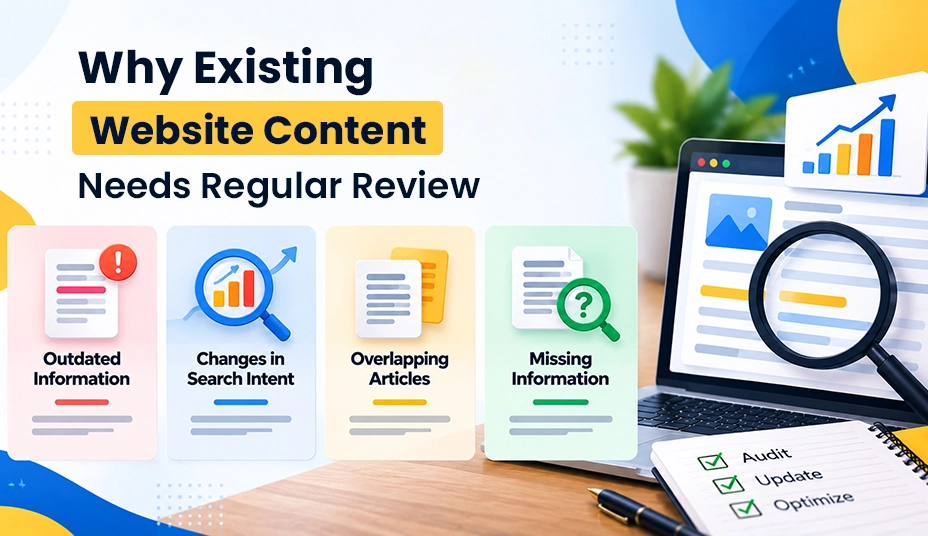
Here are four common reasons to review your existing website content.
Outdated Information
Content about software, pricing, regulations, industry trends, and SEO practices can become outdated as things change. Even evergreen articles may contain broken links, outdated screenshots, or recommendations that no longer apply.
Reviewing these pages helps keep information accurate and gives readers advice they can still use.
Changes in Search Intent
Search intent refers to what users want to find or accomplish when they enter a query into a search engine.
For example, someone searching for a website content audit may be looking for a step-by-step checklist, a content audit spreadsheet, or advice on prioritizing pages for improvement. If an article only defines a content audit, it may not fully address what that person needs.
Reviewing the queries that bring visitors to a page can help you identify missing information and determine whether the content needs a different structure or a more detailed explanation.
Overlapping Articles
As a website grows, different articles may start covering the same topics. Some overlap is natural, but when multiple pages target similar queries and serve the same search intent, they may compete for visibility or provide little additional value.
Compare the purpose, target queries, and information covered by each page before deciding whether to keep them separate or consolidate them into a more useful resource. This review can also help identify potential keyword cannibalizationSEO copywriting.
Missing Information
A page may answer its main question but still leave readers unsure about what to do next.
For example, a guide to auditing website content might explain how to identify underperforming pages without showing readers how to prioritize updates or measure their results.
Identifying these gaps helps you strengthen existing content with useful information instead of adding length that does not serve the reader.
How to Conduct a Website Content Audit Step by Step
A website content audit works best when you follow a clear process. The goal is to understand how your existing pages perform, identify what needs attention, and decide which improvements are worth prioritizing.
Step 1: Create a Content Inventory
Start by creating a list of the important URLs on your website. Include blog posts, service pages, landing pages, resource guides, and other content that supports your business goals.
You can collect URLs from your content management system (CMS), XML sitemap, website crawler, or Google Search Console. For larger websites, tools that generate XML sitemaps can help you organize the URLs you need to review.
Organize the information in a spreadsheet with columns such as:
| Field | Purpose |
|---|---|
| URL and page title | Identifies the page being reviewed |
| Content type | Distinguishes blog posts, service pages, and other formats |
| Main topic | Records the subject covered by the page |
| Primary keyword | Identifies the page’s main target query |
| Clicks and impressions | Shows how the page appears and performs in search |
| Last updated date | Helps identify content that may need a freshness review |
| Audit findings | Records content gaps, overlap, and accuracy issues |
| Recommended action | Specifies whether to keep, update, expand, consolidate, redirect, or remove the page |
You do not need to collect every possible metric at this stage. Start with the information that helps you understand each page’s purpose, condition, and performance.
Also, check for important URLs that may be missing from your sitemap or initial crawl. Pages with few internal links can be overlooked, so look for orphan pages that may not be easily discoverable through your website’s existing link structure.
Step 2: Review Search Performance
Once your inventory is ready, examine how people find your existing content through search.
Google Search Console provides data on impressions, clicks, click-through rate (CTR), and average search position. Reviewing Google Search Console query groups can also help you understand the search terms associated with your pages and identify patterns worth investigating.
For example, a page losing clicks may be experiencing a ranking decline, reduced search demand, or increased competition. A page with many impressions but few clicks may need a more relevant title or meta description. Before making changes, review the queries bringing up the page and examine the search results to understand what may be happening.
However, low traffic does not automatically mean a page is weak. It may answer an important customer question, support a service page, or attract relevant visitors through backlinks and other channels.
The goal is to understand each page’s performance in context rather than make decisions based on a single metric.
Step 3: Evaluate Search Intent and Content Quality
Review the search queries associated with each page and consider whether the content meets the needs of the people searching for that topic.
Check whether the page:
- Answers the main question clearly.
- Provides enough information to help readers understand the subject.
- Includes relevant examples or practical instructions.
- Uses clear headings and a logical structure.
- Explains important limitations or exceptions.
- Offers a useful next step when appropriate.
For example, a page about choosing an SEO audit tool should help readers understand important features, compare options, and recognize each tool’s limitations. A brief definition of an SEO audit would not fully meet that need.
Search results can help you understand what users expect, but your goal should be to provide a genuinely useful answer rather than simply reproduce what competing pages already cover. Applying effective SEO copywriting practices can help make the content clearer, more relevant, and easier to act on.
Step 4: Identify Content Gaps and Outdated Information
Review each priority page to check whether its information is accurate, relevant, and complete.
Verify statistics, dates, external references, product details, screenshots, and recommendations. If the subject has changed, update the affected sections using reliable sources. Reviewing content decay and refresh strategies can help you understand when older content may need attention.
Next, identify questions the page leaves unanswered. These might include practical steps, common mistakes, examples, limitations, or decisions readers need to make.
For instance, a website content audit guide could be more useful with a clear prioritization framework or a sample spreadsheet readers can adapt to their own websites.
Avoid adding sections simply to make an article longer. Every addition should help readers understand the topic or complete a task.
Step 5: Check for Overlapping or Competing Pages
Compare pages that cover related subjects. Look at their intended audiences, target queries, search intent, structure, and unique contributions.
Two articles about technical SEO can serve different purposes if one explains the basics and the other provides an advanced troubleshooting checklist. However, if both target the same audience, answer the same questions, and repeat much of the same information, consolidating them may make sense.
Before combining pages, review their traffic, backlinks, internal links, and business value. If consolidation is appropriate, retain the strongest material, remove unnecessary repetition, and redirect the retired URL to a relevant replacement when necessary.
Do not merge pages simply because they share a keyword. Their purpose and the search intent they satisfy are more important than superficial similarities.
Step 6: Decide What to Do With Each Page
After reviewing the content, assign a clear action to each page.
| Action | When to Use It |
|---|---|
| Keep | The page remains accurate, useful, and relevant. |
| Update | Existing information, examples, or explanations need revision. |
| Expand | Important questions or supporting details are missing. |
| Consolidate | Similar pages would provide more value as one resource. |
| Redirect | A retired URL has a relevant replacement. |
| Remove | The page has no continuing purpose and does not need a replacement. |
Use your findings to make decisions rather than relying on traffic numbers alone. A page with little traffic may still support an important business goal, while a popular page may need attention if its information is inaccurate or no longer useful.
Before removing or redirecting a URL, check its backlinks, internal links, and role within the wider website. Redirect retired pages to relevant destinations rather than automatically sending them to the homepage.
Step 7: Prioritize Improvements
A content audit is only useful when the findings lead to action. Once you have assigned an action to each page, prioritize the work based on its likely benefit, urgency, effort, and dependencies.
For example, correcting inaccurate information on an important page may take priority over making minor editorial changes to an article with limited business relevance. Improving a key service page may also be more valuable than expanding a blog post that already meets its readers’ needs.
A simple priority system can help organize the work:
- High priority: Significant accuracy issues, important content gaps, or problems preventing a page from serving its purpose.
- Medium priority: Meaningful improvements to relevant pages, such as clearer explanations, better examples, or stronger topic coverage.
- Low priority: Minor editorial changes with limited expected benefit.
Assign an owner and target date to each task. Record what you changed and why, so you can evaluate the results during your next review. A suitable SEO reporting tool can help you monitor performance and assess whether your updates are delivering the expected results.
Tools That Help With a Website Content Audit
The right tools can make a website content audit easier by helping you collect data, review existing pages, and organize improvements.
Google Search Console shows how your pages perform in Google Search, including impressions, clicks, search queries, and average position. You can use this data to identify pages that may need further investigation.
Google Analytics or another analytics platform helps you understand how visitors interact with your content, including traffic, engagement, and conversions when the relevant tracking is configured.
Website crawling tools help you collect URLs and spot issues such as broken links, missing page titles, and redirect chains. They can also make it easier to review large websites without checking every URL manually.
Spreadsheets provide a practical way to organize your content inventory, document audit findings, assign tasks, and track completed updates.
For a closer look at your options, explore these guides to SEO reporting tools and website audit tools.
However, tools can only tell you so much. They can help identify performance patterns and technical issues, but they cannot independently judge whether a page provides reliable advice, answers readers’ questions, or should be combined with another article. Human review is still essential for making informed content decisions.
How Content Auditing Fits Into a Wider SEO Strategy

A website content audit works best as part of an ongoing SEO strategy, not as a one-time task. Regular reviews help businesses keep content relevant, address performance issues, and identify opportunities to improve the website over time.
Engage Coders’ guide to website blog and content structure offers a broader look at how content quality and site organization support an effective website. After identifying potential issues, a technical review can help uncover problems with crawling, indexing, redirects, or other factors that affect search performance. The complete SEO audit process explains how these checks fit into a wider website review.
Each activity serves a different purpose. A content audit evaluates what your pages communicate and how well they meet user needs. A technical SEO audit examines whether search engines can access and process your website properly. Performance monitoring then helps you assess whether updates are improving visibility, engagement, and conversions.
For businesses that need support turning audit findings into action, exploring Engage Coders’ SEO services can be a starting point for identifying improvements that align with their website’s goals.
Common Website Content Audit Mistakes
Removing Pages Based on Traffic Alone
Low traffic does not automatically make a page unnecessary. Before removing it, review its purpose, relevance, backlinks, and contribution to the wider website. A page may still support important user journeys or provide value that traffic numbers alone do not reveal.
Updating Every Page at Once
Trying to revise every page at the same time can stretch resources and delay higher-priority improvements. Start with pages that have clear issues or meaningful opportunities, then work through the remaining content in order of priority.
Changing URLs Without a Plan
Changing established URLs unnecessarily can break internal links and affect existing search visibility. Keep URLs unchanged where practical. If a change is necessary, plan and implement appropriate redirects, then update internal links to point to the new URL.
Adding Keywords Without Improving the Information
Repeating keywords will not fix incomplete answers, outdated details, or content that fails to match search intent. Focus on making the information accurate, useful, and relevant first. Then incorporate target keywords and related phrases naturally where they help readers understand the topic.
Failing to Measure the Results
Record baseline performance and document the changes made during the audit. After publishing updates, monitor relevant search and analytics data to understand how the pages perform. Allow time for changes to take effect, and consider normal performance fluctuations before deciding whether further improvements are needed.
Find Out Which Website Pages Need Improvement
Turn your content audit findings into a clear plan to improve content quality, search visibility, and website performance.
Get SEO Help
Ready to Audit Your Website Content?
A website content audit helps you identify outdated information, content gaps, and opportunities to improve search performance. By reviewing your pages regularly and prioritizing changes based on their value, you can keep your content useful, relevant, and aligned with your SEO goals.
Ready to make your website content work harder? Contact Engage Coders to explore SEO and content optimization solutions tailored to your business needs.
FAQs
The ideal frequency depends on your website and how often its content changes. Websites that publish or update content regularly may benefit from quarterly reviews, while smaller websites with stable information may need less frequent full audits. Review time-sensitive pages whenever important details change.
No. Pages that remain accurate, useful, and relevant may not need any changes. A content audit helps you identify where improvements are worthwhile rather than creating unnecessary editing work.
A content audit evaluates the accuracy, relevance, usefulness, search intent, and topic coverage of your pages. A technical SEO audit examines factors such as crawling, indexing, site structure, redirects, and technical performance. Both are important parts of an effective SEO strategy.
A content audit can uncover opportunities to improve content quality, relevance, and accessibility. However, the impact on rankings depends on the issues identified, the improvements made, competition, search demand, and other factors. Better rankings are not guaranteed.
Start with pages that serve an important business purpose, attract meaningful search visibility, show declining performance, contain outdated information, or have clear content gaps. Prioritize improvements based on their potential value and the effort required to complete them.


