

How to Secure a Yahoo Business Listing to Enhance Local Visibility
Table of Contents
- Understanding Yahoo Business Listings
- Steps to Create a New Yahoo Business Listing
- Steps to Claim an Existing Yahoo Business Listing
- Advantages of Having a Yahoo Business Listing
- Expanding Your Brand’s Local Visibility Beyond Yahoo
- FAQs
Understanding Yahoo Business Listings
A Yahoo Business Listing refers to an online reference of your local business details (a local citation) that can show up in Yahoo search results. These listings display essential information about your business, such as its name, address, and phone number (NAP). Additionally, your listing may appear in Yahoo map results when users look for businesses in their vicinity.
For instance, searching for “plumbers denver” will display nearby local businesses, much like how Google Maps operates. With Yahoo holding 2.24% of the mobile search engine market share, it’s clear that real users rely on it to find businesses like yours. Moreover, maintaining a presence on Yahoo serves as an excellent supplement to your Google Business Profile.
Given that it’s free and straightforward, creating or claiming your Yahoo business listing is a valuable step toward improving your local SEO. By ensuring your business appears in Yahoo search and maps, you increase your chances of reaching potential customers who use this platform.
Steps to Create a New Yahoo Business Listing
To get your business listed on Yahoo, visit Yahoo Local, choose the “New listing” option, and click on “Claim a new listing.”
Navigation for adding a new Yahoo business listing.
You’ll be redirected to The Real Yellow Pages website to set up your listing. Yahoo no longer manages its own business listings. Instead, it showcases listings from The Real Yellow Pages in its search engine results pages (SERPs).
If The Real Yellow Pages already has data about your business, it will appear in the drop-down menu when you search by location and name. Click “Claim Now.”
Business location and name are selected.
Next, input your contact details to claim your business listing.
Page allows you to provide additional information.
If The Real Yellow Pages lacks information about your business, no results will appear in the drop-down menu. In this case, select “click here” (or call the provided phone number) to submit your business details.
Business location and name are selected, but no matches are found. A blue hyperlink provides further instructions.
You’ll then be directed to a new page where you can enter your basic listing information. Once the form is complete, click “Submit.”
Page allows you to include more details to connect with a Yahoo Business Advisor.
Steps to Claim an Existing Yahoo Business Listing
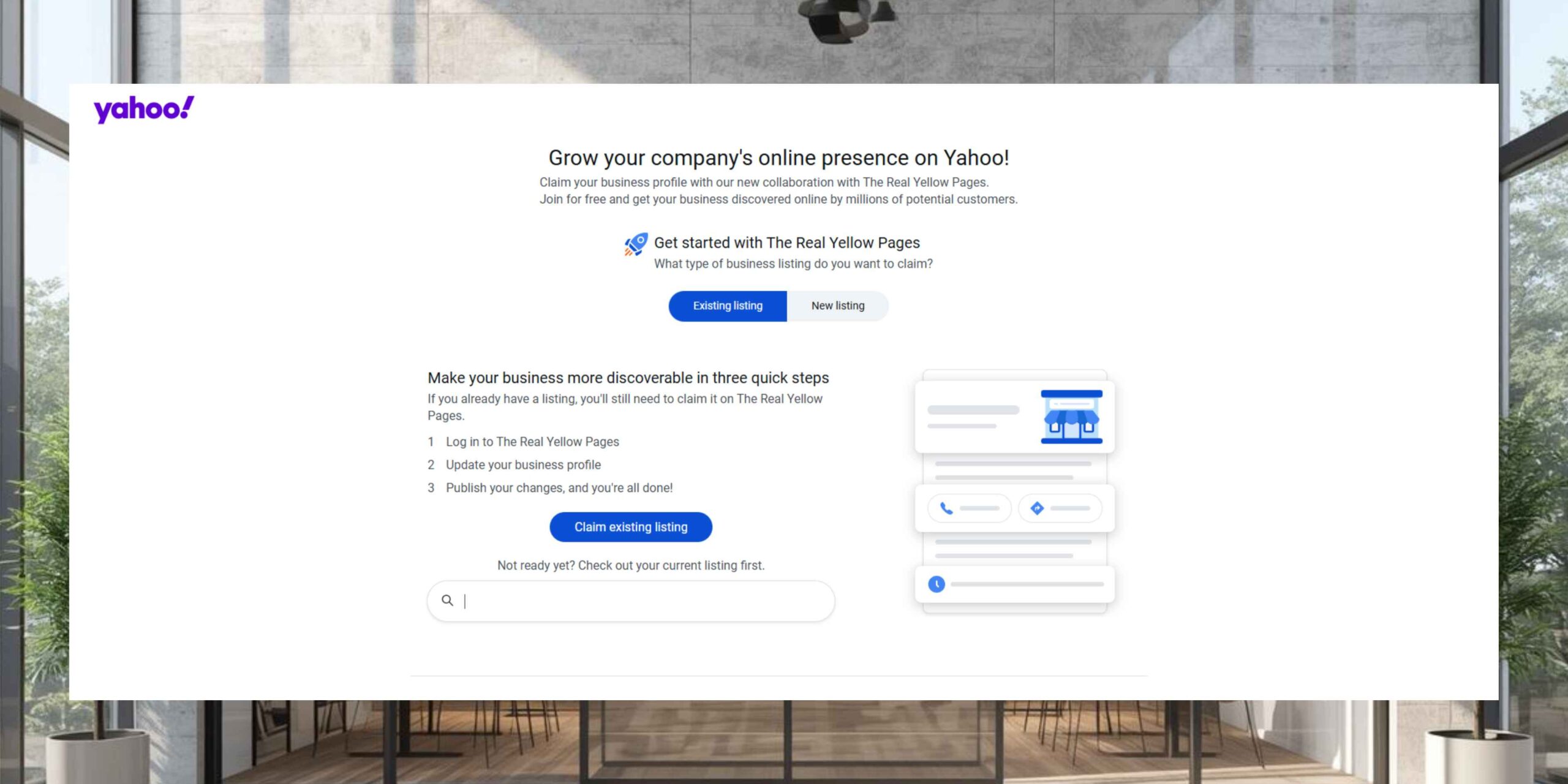
To claim a Yahoo business listing that is already live, go to Yahoo Local, select the “Existing listing” tab, and click “Claim existing listing.”
Navigation for claiming an existing Yahoo business listing is displayed.
Search for your listing by entering your location and business name, then pick it from the drop-down menu. After that, click “Claim Now.”
Business location and name are selected.
Next, follow the on-screen instructions to update your contact details and claim your listing. Complete the verification process when a Business Advisor contacts you.
Alternatively, you can search for your existing listing using the Yahoo search bar. Once your business appears in the results, click “Verify your listing,” which is located near the bottom of the listing.
Verify listing is highlighted on the business profile in the Local maps section.
You’ll then be taken to a page where you can update your contact information.
**Note:**
If another individual has already claimed your Yahoo Business listing, you may not be able to claim it through the self-service portal. In such cases, call the provided phone number for assistance.
Advantages of Having a Yahoo Business Listing
Claiming your Yahoo business directory listing offers several key benefits, primarily helping you connect with more potential customers.
More specifically, a Yahoo listing is advantageous for:
- Maintaining Consistent Local Business Information: This ensures users have accurate and up-to-date details about your business.
- Enhancing Organic Rankings on Google: Google considers consistent and accurate data across local directories when ranking businesses in local search results.
- Reaching Yahoo Users Searching for New Businesses: Being visible on Yahoo opens doors to new audiences who rely on the platform to discover businesses.
Expanding Your Brand’s Local Visibility Beyond Yahoo
Listing your local business on platforms beyond Yahoo allows you to maximize your reach and connect with as many potential customers as possible.
For this purpose, use Semrush’s Listing Management tool to distribute your business information efficiently across multiple directories. Start by checking whether your business is listed on major directories and identify any issues that need resolution.
Free business listing scan displays a list of directories, your business’s status on each, and issues like incorrect addresses, missing listings, or wrong business names. You can manually correct these listings on the respective directory websites.
Partner with our Digital Marketing Agency
Ask Engage Coders to create a comprehensive and inclusive digital marketing plan that takes your business to new heights.
Contact Us
Alternatively, sign up for the Semrush Local Toolkit to automate the process and ensure your information is updated seamlessly.
[https://smallbusiness.yahoo.com/]
By leveraging tools like Semrush and ensuring your business is listed accurately across various platforms, you can significantly enhance your online visibility, improve your local SEO, and attract more customers through Yahoo search ranking and other directories.
FAQs
A Yahoo local listing is an online profile that displays your business name, address, and phone number (NAP) on Yahoo search and map results. It acts as a digital citation that helps users find your services and strengthens your local search presence.
To create a listing, visit Yahoo Local, choose the New Listing option, and submit your business details through The Real Yellow Pages. This ensures your business appears in Yahoo’s local search results.
Search for your business on Yahoo Local, select the listing, and click Claim Now. Verification allows you to manage your profile, update details, and control how your brand appears online.
You must provide accurate business name, physical address, and phone number to maintain Yahoo NAP consistency. Correct information is essential for verification and customer trust.
Your listing places your business in Yahoo search and maps, expanding reach beyond Google users and strengthening overall local SEO visibility.
Yes. Verified Yahoo local listings appear in Yahoo Maps when users search for nearby services, helping drive local traffic and inquiries.
Search engines cross-check data from trusted directories like Yahoo. Consistent listings improve credibility, authority, and overall local search rankings.
If your business is missing, submit a New Listing through The Real Yellow Pages, Yahoo’s official data provider.
You can update your information by claiming your listing or using local SEO management tools to keep data accurate and consistent.
If the listing is already claimed, contact Yahoo or The Real Yellow Pages support and provide proof of ownership to regain control.


